
Send reliable notifications to your team inbox.
ALERTING & NOTIFICATIONS
Know About Issues Before Users Do
Turn infrastructure signals into timely action. Set severity-based rules, route alerts to the right channels, and give your team the context to acknowledge and resolve incidents faster.
EmailSlackTelegramWebhooksAlert RulesIncident Timeline
3 levelsSeverity control
5 channelsTeam notification
24/7Incident awareness
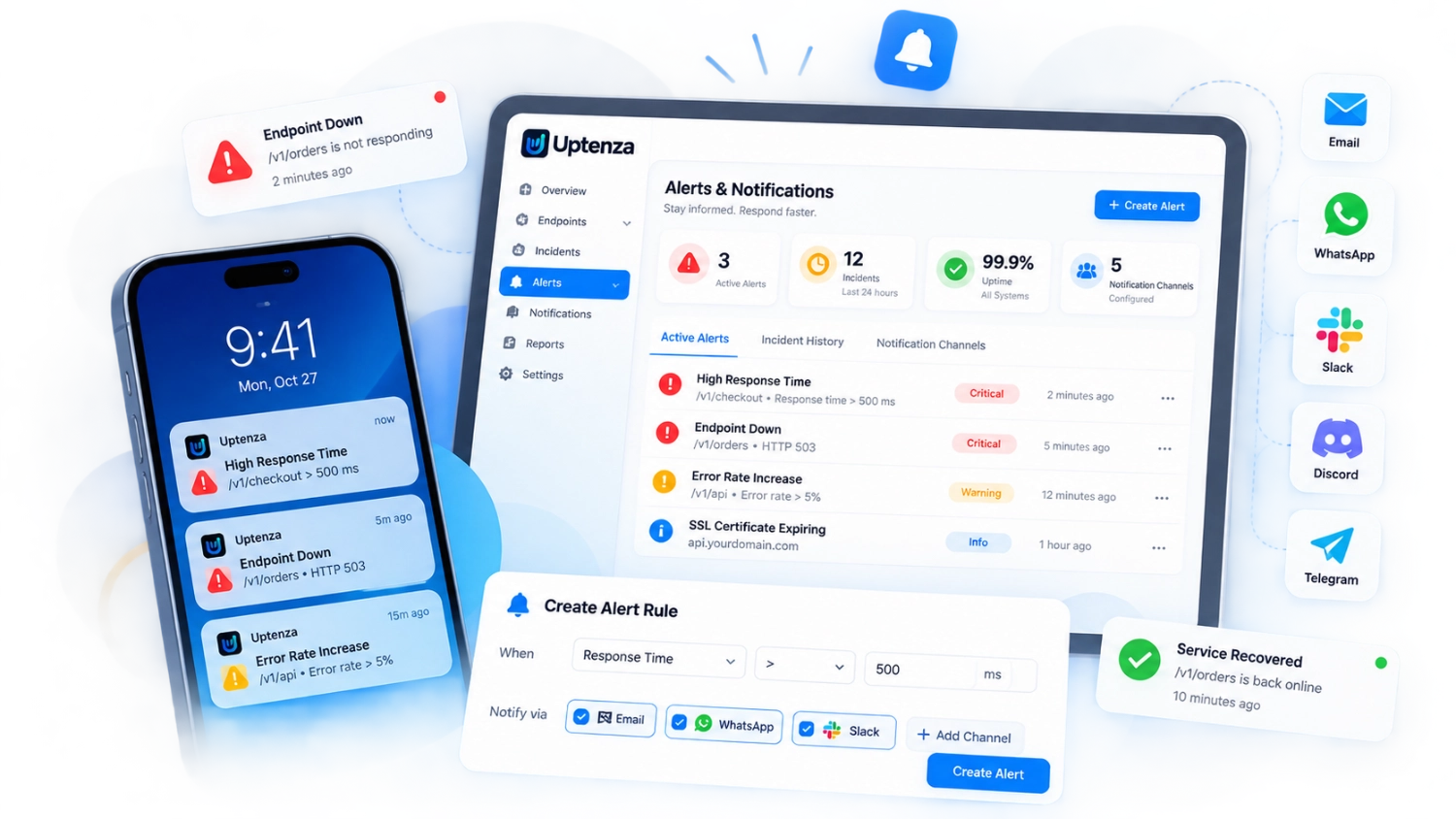
REACH YOUR TEAM
Notification Routing That Works
Connect Uptenza to the channels your team already uses and make sure the right people get notified at the right time.
Slack
Notify teams and channels instantly.
Telegram
Get real-time alerts wherever you are.
Webhooks
Send alerts to your own workflows and tools.
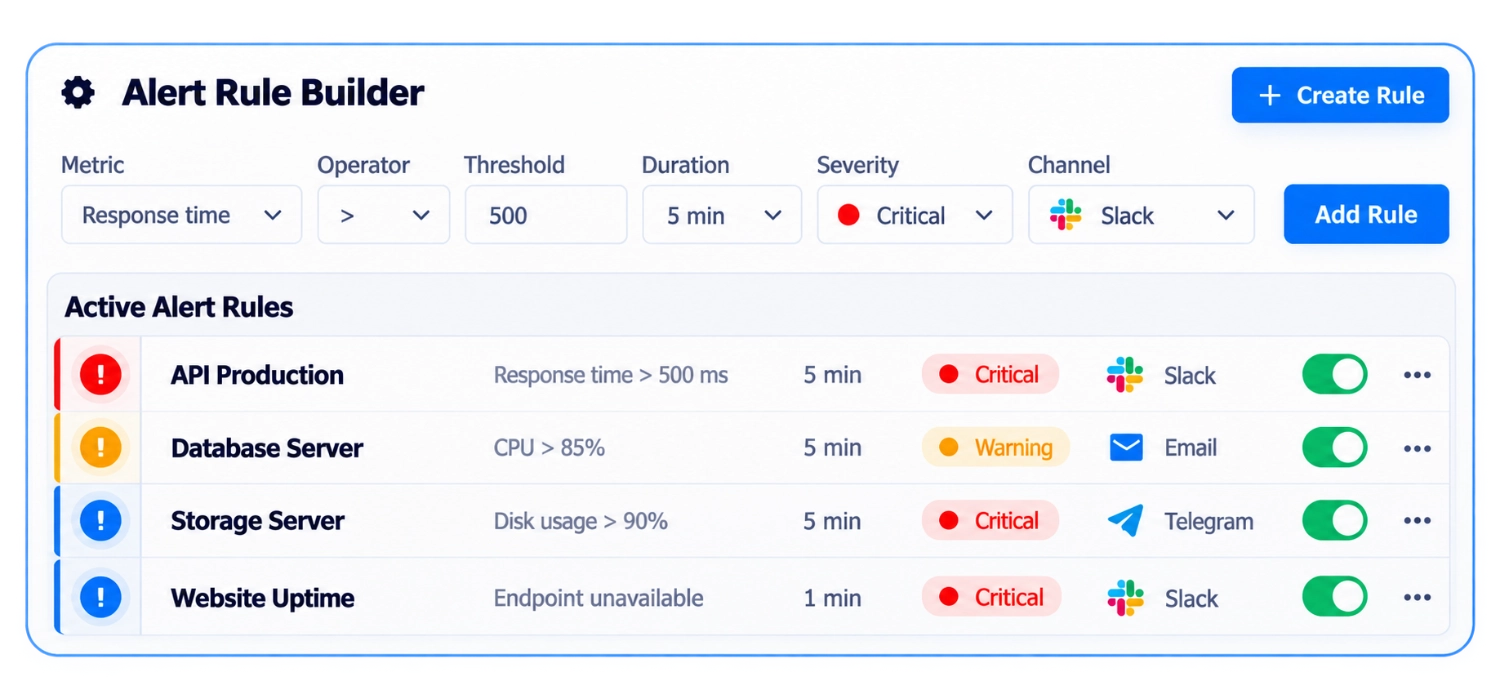
CUSTOM RULES & THRESHOLDS
Create Alerts That Match Your Infrastructure
Set up custom alert rules that fit your environment and focus on what matters most.
- Custom thresholds for any metric
- Multiple severity levels (Critical, Warning, Info)
- Flexible evaluation windows
- Route to the right channels and teams
REDUCE ALERT NOISE
Smarter Alerting That Reduces Noise
Uptenza intelligently groups and deduplicates alerts so your team can focus on real issues.

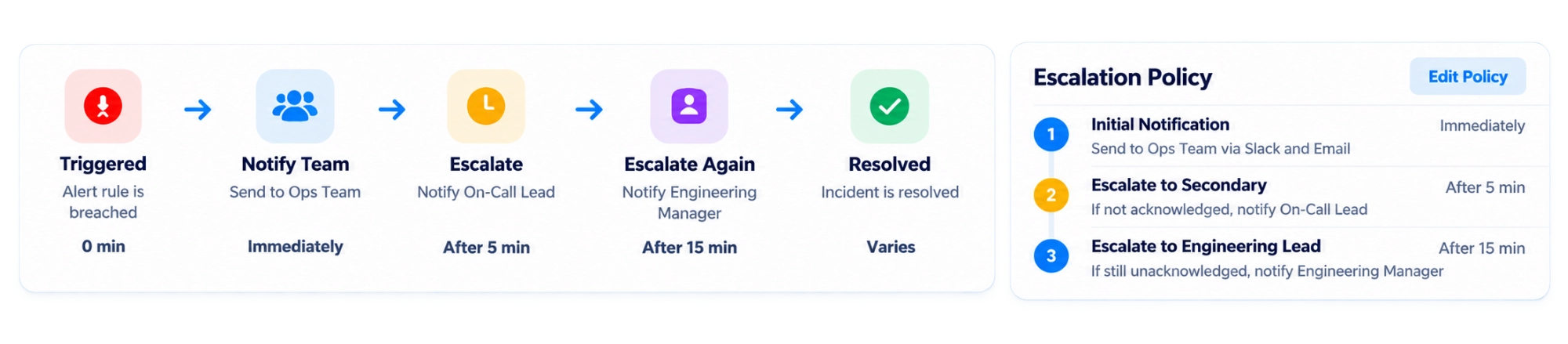
ESCALATION WORKFLOWS
Get Alerts to the Right Person, Faster
Automatically escalate alerts when they aren't acknowledged, so critical issues never go unnoticed.
INCIDENT LIFECYCLE
From Detection to Resolution
Track every step of an incident, from the initial alert to final resolution.
- See the full timeline of events
- Know who was notified and when
- Keep your team aligned with clear status updates
- Resolve incidents faster with the right context
Incident Timelineââ€â€Â Resolved
Triggeredtime above 500 ms on API Production
Notification SentSent to ops via Slack
AcknowledgedAcknowledged by Sarah Chen
InvestigatingChecking server metrics and logs
ResolvedResponse time back to normal
ALERT HISTORY
Last 7 days⌄See What Happened and Who Was Notified
View a complete history of alerts, notification delivery status, and who acknowledged each incident.
| Event | Severity | Channel | Delivery Status | Acknowledged By | Time |
|---|---|---|---|---|---|
| High Response Time Detected | ââ€â€Â Critical | Slack | ââ€â€Â Delivered | Sarah Chen | Apr 24, 10:00 AM |
| Database Load Increasing | ââ€â€Â Warning | ââ€â€Â Sent | Michael Torres | Apr 24, 09:42 AM | |
| Disk Usage Above 90% | ââ€â€Â Critical | Telegram | ââ€â€Â Failed |  | Apr 24, 08:15 AM |
| Service Recovered | ââ€â€Â Info | Webhook | ââ€â€Â Delivered |  | Apr 24, 07:28 AM |
HOW IT WORKS
Configure, Detect, Notify, Respond
Get from setup to resolution in four simple steps.
1
Configure Rules
Set thresholds, channels, and escalation policies.
2
Detect Issues
Uptenza monitors your infrastructure 24/7.
3
Notify Teams
Get instant alerts through your preferred channels.
4
Resolve Faster
Work together to resolve incidents quickly.
Frequently Asked Questions
Find answers to common questions about alerting and notifications in Uptenza.
What notification channels does Uptenza support?
The design supports email, Slack, Telegram, webhooks, alert rules, and incident timelines. Verify availability for your plan before enabling a channel.
Can I configure custom thresholds?
Yes. Alert rules can be configured with metric thresholds, severity levels, evaluation windows, and routing destinations.
Does Uptenza support alert escalation?
Escalation workflows are represented as a planned product capability and this page is only a static illustration.
Can I reduce duplicate alerts?
The product concept includes grouping and deduplicating related events so teams can focus on meaningful incidents.
Can alerts create incidents automatically?
Incident creation and processing should be confirmed for the selected Uptenza plan; this marketing preview does not connect to a backend.
Can I acknowledge alerts from Slack or Telegram?
The preview shows channel routing and acknowledgement states as illustrative examples, not live integrations.
Stay Ahead of Every Incident
Start building a faster, more reliable response workflow.